Why Auto-Cycle?
Sometimes a Litter Robot goes quiet — it stops cycling on its own and just sits idle. This can happen after a sensor hiccup, a brief power issue, or simply because no cat has triggered it in a while. Left unattended, the litter box goes uncleaned and odor builds up.
With RobotSitter's inactivity-based clean cycle, you can tell your robot to automatically start a cleaning cycle if it hasn't reported any activity for a specified number of hours. No power cycling, no manual intervention — just a gentle nudge to keep things fresh.
How to Set It Up
- Go to your Notifications page
- Click "Create Notification Rule"
- Select the robot you want to monitor
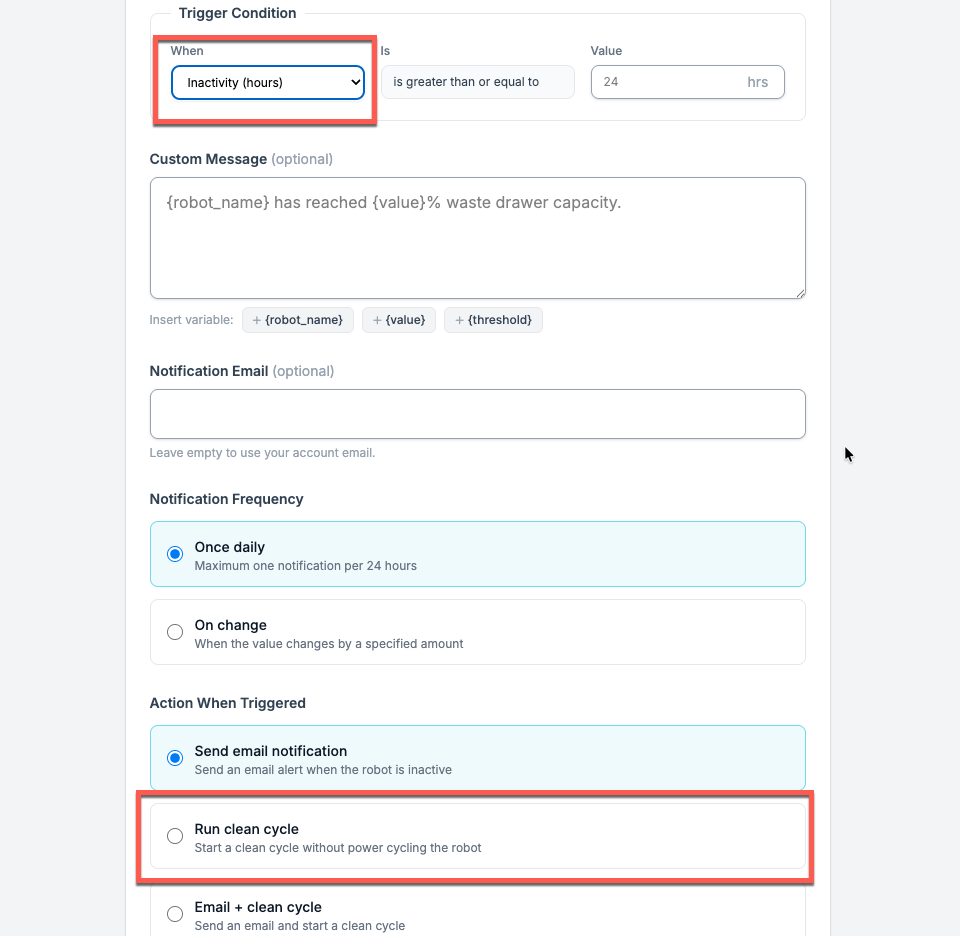
- Under Trigger Condition, set "When" to Inactivity (hours)
- Set your threshold — for example, 24 hours means the robot must be silent for a full day before the action fires
- Under Action When Triggered, choose "Run clean cycle"
- Save the rule
Available Actions
When the inactivity threshold is reached, you can choose from several actions:
- Send email notification — Get an alert so you can decide what to do
- Run clean cycle — Automatically start a cleaning cycle without power cycling the robot
- Email + clean cycle — Get notified and trigger a clean cycle at the same time
- Restart (power cycle) — A full power off/on restart for more serious issues
- Email + restart — Get notified and power cycle the robot
Tips & Best Practices
- Start with 24 hours — This is a safe default. If your robot normally cycles every few hours, a 24-hour silence is a clear sign something is off.
- Use "Run clean cycle" for gentle intervention — Unlike a full restart, a clean cycle simply tells the robot to rotate without toggling power. It's less disruptive and usually enough to get things moving again.
- Pair with email notifications — Choose "Email + clean cycle" so you stay in the loop while the robot handles itself.
- Set notification frequency to "Once daily" — This prevents repeated alerts if the robot stays inactive for an extended period.
Set It and Forget It
Once configured, RobotSitter checks your robot on a regular interval. If the inactivity threshold is reached, it acts automatically — so you don't have to remember to check on it yourself.